

Account structure
Understand account structures to design an integration that suits your business needs.
To design an integration that suits your use cases, you first need to understand the different accounts and resources that make up your business in Datman, and how they are connected.
As a reseller or platform, you maintain the relationship with your merchants, and your merchants' shoppers interact directly with your merchants. Datman processes payments for your merchants through multiple acquirers, holds their funds and pays them out.
Your reseller account
When you sign up with Datman, you receive a reseller account and an API key that belongs to it.
With your reseller account, you can:
- Create merchants and follow their onboarding.
- See your whole portfolio: how many merchants you have and where each one is in onboarding.
- Take payments, and change and refund them, on behalf of your merchants.
- Read the transactions, balances and payouts of your merchants.
Your API key only gives access to your own merchants. If you send the MID of a merchant that does not belong to your reseller, the request fails with a 404 (or a 403 on some endpoints).
Reseller resources
The following resources represent your business and your merchants in Datman:
- Reseller: represents your business. A reseller owns the relationship with its merchants and earns commission on their payments.
- Merchant: a business that takes payments through Datman, for example a restaurant or a takeaway. Each merchant is identified by a merchant ID (MID), which Datman issues when you create the merchant. The response contains
merchantId. Save it, because you need the MID in almost every other request. - Shop: the physical location or outlet of your merchant's business. One shop is one merchant with one MID. When you create the merchant, you send
storeId: your own identifier for the shop. - Liable account: a merchant account, with its own MID, that belongs to your business. You use it to keep your share of the money, for example the splits or charges that you collect. You can ask Datman for several liable accounts, so that you can reconcile different splits or charges separately.
- Delivery partner: a merchant without a shop, created with
isPartnerset to true and nostoreId. A delivery partner can receive part of another merchant's payment as a split, for example a delivery fee.
We recommend creating one merchant, with its own MID, for each shop. You can use one MID for several shops, but this makes reconciliation harder. When a business has several shops, you can create the merchant for each new shop with the same business documents. The new merchant then does not need to be verified again, and is approved quickly.
This feature is in beta. Contact Datman support before you go live with it.
Your merchants' resources
Each merchant also has resources that hold and pay out its funds, and that describe its business:
- Datman account: holds the funds of your merchant. Shoppers' funds are held in a Datman account until they are paid out. You can see the merchant's current balance at any time.
- Bank account: your merchant's verified bank account, where they receive payouts.
- Payout schedule: decides when the funds in the merchant's Datman account are paid out to the bank account, for example every weekday at 07:00. See the payout schedule.
- Business and owner details: the legal name, address, owners and documents of the merchant's business. Datman uses this information to verify your merchant, as required by payment industry regulations. You send these details when you create the merchant, and can add to them later.
- Users: the people who can log in to manage the merchant. You can list a merchant's users with their role and
status: Active after they complete sign-up, otherwise Pending. Users log in to the merchant portal.
If you have used other payment platforms, the following table shows how the Datman resources compare to resources you may know:
| Datman resource | What it represents | Comparable to |
|---|---|---|
| Reseller | Your business, and the owner of your API key | Platform account |
| Merchant (MID) | One of your merchants, with its verification status | Account holder |
Shop (storeId) | The location the payments are taken for | Store |
| Datman account | The funds held for the merchant until payout | Balance account |
| Bank account | Where the merchant is paid out | Transfer instrument |
| Business and owner details | The data used for verification checks | Legal entity |
| Payout schedule | When funds are paid out | Sweep or payout schedule |
Example account structure
In the following example, you are a reseller called Example Payments Partner. You bring a takeaway in Manchester, Example Pizza Ltd, to Datman. Its orders are delivered by Example Delivery Ltd, which is also a merchant of yours.
You can classify resources based on whether they belong to you or to your merchants.
Resources belonging to you
- A reseller account (Example Payments Partner) that represents your business.
- An API key that gives access to your merchants only.
Resources belonging to each merchant
- A merchant with a MID:
- Example Pizza Ltd, MID 12345678
- Example Delivery Ltd, MID 12345679, created as a delivery partner
- For Example Pizza Ltd, one shop: the takeaway in Manchester, with your
storeId98765. - For each merchant, a Datman account that holds its funds, a verified bank account for payouts, and a payout schedule.
- For each merchant, the business and owner details that Datman needs to verify them.
- For each merchant, one or more users who manage it.
Diagram
The following diagram shows how these resources are connected.
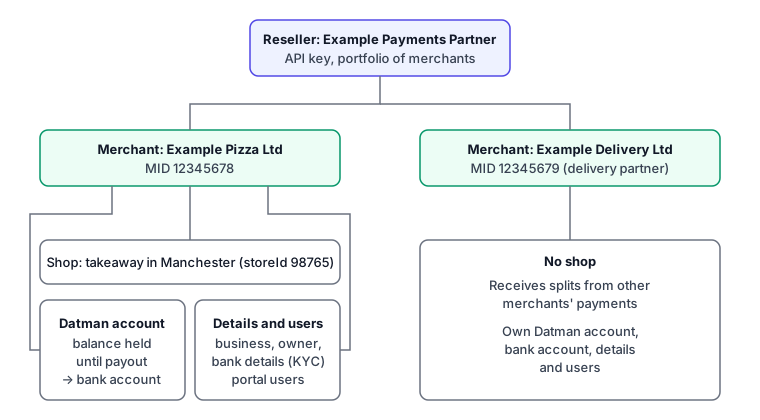
The reseller sits at the top and owns both merchants. Example Pizza Ltd has one MID and one shop. Example Delivery Ltd has its own MID but no shop. Each merchant has its own Datman account, bank account, business and owner details, and users.
Flow of funds
When a shopper in Manchester pays Example Pizza Ltd GBP 24.50 for an order:
- The payment is made for MID 12345678, and Datman processes it through one of its acquirers.
- Based on the split instructions in the payment request, part of the payment can go to another merchant. In this example, the delivery fee goes to Example Delivery Ltd.
- The funds are kept in each merchant's Datman account until they are paid out.
- Datman pays out to each merchant's verified bank account, according to their payout schedule.
For the full example, with settlement timings, see Flow of funds.